Published by Nexus.

Sextant Rankings

Rank 4 of 7

Dify

What is Dify?

Some pilots stall for a reason that has nothing to do with the agent's quality: the compliance office will not let the data leave the building, and the vendor on trial runs only in its own cloud. Dify is the platform on this site best placed to unblock that particular objection.
Visit site: Dify

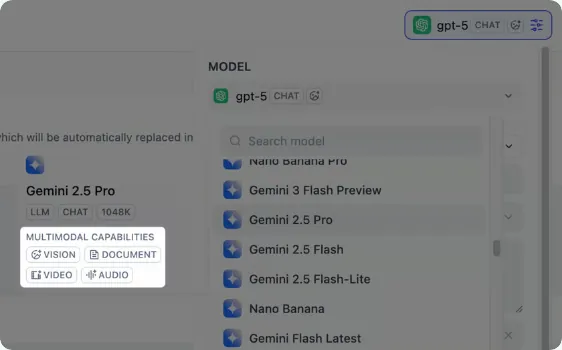
workflow model selector showing multimodal capability tags
Dify: workflow model selector showing multimodal capability tags. Source: docs.dify.ai/en/cloud/use-dify/build/agent, checked November 8, 2026.
In this article
  1. Dify: the answer when a pilot stalled on where the data may live
  2. Open source, with conditions a lawyer should read
  3. How agents and workflows are put together
  4. Hosting choices, the core of the case
  5. The work of running it yourself
  6. Connections to other systems
  7. Controls for a production deployment
  8. Plans, prices and limits
  9. Who uses it and what they report
  10. Verdict for a team with a stalled pilot

Dify: the answer when a pilot stalled on where the data may live
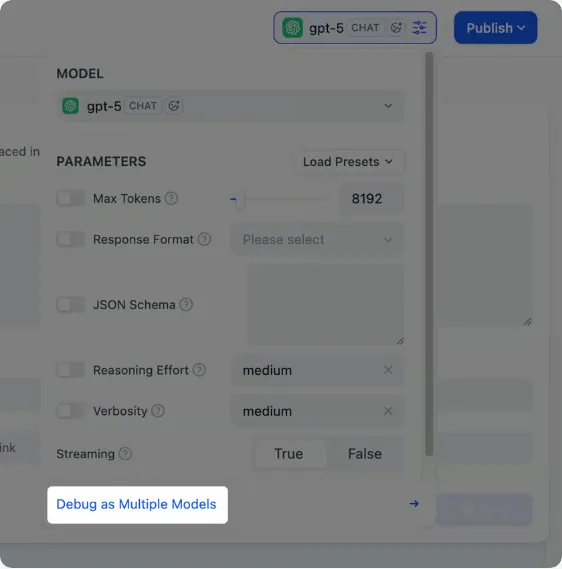
model parameter panel with the debug as multiple models option
Dify: model parameter panel with the debug as multiple models option. Source: docs.dify.ai/en/cloud/use-dify/build/agent, checked November 8, 2026.

Some pilots stall for a reason that has nothing to do with the agent's quality: the compliance office will not let the data leave the building, and the vendor on trial runs only in its own cloud. Dify is the platform on this site best placed to unblock that particular objection. Three self descriptions sit side by side: the docs home page speaks of open source software for making AI applications1, GitHub narrows that to LLM app development2, and the homepage title, the one most relevant to this site, promises agentic workflows fit for production3.

This site ranks Dify fourth. It offers a set of hosting choices, including air gapped installs, and its enterprise tier lists the controls a security reviewer looks for. It ranks below the three ahead of it for a stalled pilot because the build falls to the customer or to a partner the customer pays, and a self hosted install also makes the customer the operator; a Dify team that takes over a stalled pilot and carries it to production is not publicly stated on the pages we opened.

Open source, with conditions a lawyer should read

The open source story is a large part of Dify's appeal, and it comes with fine print. The homepage lists a source available Community Edition that can be self hosted with Docker and shows a count of more than 148K stars4, while the GitHub page itself displayed 160.7k stars when checked5, so the two figures disagree. The legal basis is the Apache 2.0 text with extra conditions written into the LICENSE file6, and the homepage, for its part, labels the result a derivative of Apache 2.07; neither description makes it a standard open source license for procurement purposes. One of those conditions matters to any company planning a shared internal service: without written authorization, the Dify source code may not be used to run a multi tenant environment8. A legal reviewer should read the license before a self hosted pilot is promoted into a platform for several business units.

How agents and workflows are put together

The build surface is visual. Workflow Studio is the canvas on which agentic workflows are drawn9, and a maker can either set an agent up manually or simply hold a conversation with the builder until the agent takes shape10. Source material arrives through the Knowledge Pipeline, which builds repeatable ingestion from drives, online documents, websites and plain files11; a team that wants finer control can use a classic knowledge base and decide for itself the chunking, the indexing and the search method12. The Marketplace supplies MCP integrations, data sources, tools and model providers, and anything missing there can be defined by the customer13.

For the move to production, three details count. A finished app can go out in four forms, as an embed, an API endpoint, an MCP compatible tool or a hosted experience14; each Dify capability also has its corresponding API15; and GitHub describes autonomous agents equipped with private sandboxes in which they run commands and work on files16. Once a pilot is live, operations staff get trend views, since application logs and performance are tracked and analyzable across time according to the README17.

Hosting choices, the core of the case

For a pilot blocked on data location, this is the section that matters. The enterprise page lists three places the platform can sit under the customer's control: an air gapped network, an on premises data center or the customer's own VPC18. Three variants are described. Where the customer wants to avoid running servers yet needs isolation, Dify will operate a cluster reserved for that one customer in the region it picks19. Customers who choose the customer managed VPC route install the platform in an account they already hold with Azure, GCP or AWS, and Dify asserts that in this setup the data never crosses out of the customer's security perimeter20. For defense, health or government pilots that cannot touch the internet, the air gapped variant works with no outside connection, calling models hosted on the customer's own hardware21. Dify's one line summary of residency is that the data stays in the customer's perimeter, region and VPC22. A sponsor whose objection was never about data location can skip all of this and use Dify Cloud, where the vendor runs the hosting and the customer simply builds, tests and launches apps23.

Model data handling depends on who supplies the model. Compliance officers usually ask next about model training, and the privacy policy answers that the company builds no models of its own and keeps customers' AI interactions out of any training set24. The data path then depends on the model arrangement. With a provider and API key chosen by the customer, prompts and outputs travel directly to that provider25, whereas models chosen by Dify are supplied by providers working as Dify's sub processors26. For the managed service, the policy reserves the right to hold and process information wherever LangGenius, its affiliates or its suppliers operate facilities27, a clause a European buyer will want to set against the regional enterprise options.

The work of running it yourself

Self hosting moves the pilot's data problem to the customer's operations team, and Dify's documentation is frank about what that involves. The minimum for the Docker Compose route is modest: a Docker install whose Compose component is at release 2.35.0 or above28, a host with a pair of CPU cores29 and 4 GiB of RAM30, and, for a Mac running Docker Desktop, a virtual machine sized at 8 GiB with two vCPUs31. Before the first start, a shared token must be generated so that the agent backend and its local sandbox can launch32. When the containers are running, the person installing Dify opens localhost/install and registers the administrator there33.

Several operational warnings in the guide are the kind that cause outages if missed. Upgrading is a trap for the unwary: the guide warns that restarting the containers leaves their previous environment in place, so an upgrade has to be applied by bringing the stack up again in detached mode34. Out of the box the compose file brings its own Weaviate, PostgreSQL and supporting services35, keeps Weaviate, the code sandbox, Redis and the database off the host's ports36, and ships development passwords in docker/.env that the guide says to swap out before real use37. The most expensive mistake to avoid concerns storage engines. Altering DB_TYPE or VECTOR_STORE moves no data across38, and a switch made after first launch strands whatever was already stored39, so the production database and vector store should be chosen before the pilot's documents go in.

For the Community Edition the homepage offers a Docker deployment that takes one command40, and Kubernetes shops get a Helm chart41, and the self hosting overview says Dify runs anywhere Docker does, whether that is a cloud virtual machine, a server in the company's own data center or a developer's laptop42. Teams that want none of this can sign up for the cloud service, which needs no installation and includes a free Sandbox plan43.

Connections to other systems

A stalled pilot often needs one more system connected before it can do real work, and Dify's integration layer links apps with external services, data sources, tools and models44. The callable tools fall into four kinds, OpenAPI services, published workflows, MCP servers and tool plugins45. Every Marketplace listing passes review and testing ahead of release, after which upkeep rests with its publisher46, which means a production team should check who stands behind any connector it depends on. Outside the Marketplace there are three routes: naming a public GitHub repo together with the version wanted47, installing a private one from a .difypkg package48, or pointing a custom endpoint at the customer's own API to add moderation or an external data tool49. Knowledge can be drawn from external sources such as Notion pages or Google Drive50.

Event driven agents depend on the plan. Agents that wake on events are metered by plan, starting at 3,000 trigger events on Sandbox51, rising to 20,000 each month on Professional52, and with no stated cap on Team53. A connector count comparable to the figures other vendors publish is not publicly stated on the pages we opened.

Controls for a production deployment

The enterprise tier carries the controls that typically block a pilot at the security review. For the security file, Dify's homepage attaches both ISO 27001 and SOC 2 Type II to its Enterprise edition54. The enterprise page then covers the three items a reviewer checks next: sign on through OIDC or SAML55, encryption with keys the customer brings56, and audit records built to show tampering and delivered into the customer's own SIEM57. Permissions can be set as finely as a single workflow, users can be provisioned through SCIM, and session policies are supported58; the pricing page adds several workspaces under central enterprise management for the top tier59. Among the safeguards in the privacy policy are technical ones, namely access control, encryption of data and communications, and measures that find and stop unauthorized access60, and a human one, training employees to protect personal information61. The GitHub README routes vulnerability reports through the private channel of GitHub Security Advisories62, which keeps a disclosed flaw out of public view until it is fixed.

Inside a workspace, the role model is simple. A single Owner per workspace holds full control63; Admins can do whatever Editors do and can additionally manage both people and model providers64; Editors have full authority over apps and knowledge bases, from creation to deletion65; and a Normal member can only use published apps66. Housekeeping rules are tight: an invitation stops working three days after it is sent67, a removed member loses workspace access immediately68, and a change of Owner only completes once the existing Owner enters a verification code sent by email69. Control over which people may add or debug integrations rests with the Owner and Admins70, and the key used to debug integrations under development sits behind a permission of its own71.

Plans, prices and limits

Pricing is published for the cloud plans. Professional costs $590 per workspace per year72 and Team costs $1,59073, with annual billing saving 17%74; Enterprise is custom priced75. Message credits are the main meter, 200 on the free Sandbox76 and 5,000 per month on Professional77, and a team that exhausts them can carry on with an API key of its own78. Plan changes are asymmetric: an upgrade applies the moment the customer pays the balance owed for the rest of the billing period79, whereas a downgrade only begins when the next cycle starts80. Universities get a concession under Dify for Education81, which gives verified students, teachers and staff the annual Professional plan at no cost82, with the caveat that it carries neither ticket support nor priority email83.

Team size limits shape how far a pilot can grow on the lower tiers: the Sandbox plan allows one member84 and Professional allows three85. On Sandbox, knowledge requests are throttled to ten per minute86 and logs are kept for a month87, while the Community Edition is restricted to one workspace88. A growing pilot will meet the knowledge storage cap that each plan sets, at which point the documentation says neither the classic nor the agent kind of knowledge base can take new content89. Uploads can be turned away ahead of indexing on the strength of an estimate of their size90; the block lasts until the customer either frees space or buys a bigger plan91, though searches and deletions still run while it is in force92. A pilot built on an external knowledge base or on the Knowledge Pipeline should also know that neither can later be converted into an agent knowledge base93.

Who uses it and what they report

The pricing page spells out which buyer each tier is meant for. Professional targets small teams and lone developers shipping AI apps to production94; Team is pitched at mid sized groups needing more throughput and shared work95; and Enterprise is for companies whose requirements include dedicated support along with advanced governance, compliance and security96, the tier a stalled corporate pilot would normally land on. The free Community Edition is positioned for hobby projects, open source fans and developers working on their own97. Four industries feature on the solutions pages: consumer goods, where the pitch is agents built by business teams themselves98; pharma and life sciences, with expert assistants under governance99; government, with local deployment and secure sharing among agencies100; and education, with a single knowledge base serving several campuses101.

Two customer claims on the enterprise page are relevant to a stalled pilot. One compares the time to build each AI app on Dify with the four months the customer needed when it built apps on its own102; the other counts business staff taught to create AI agents during FY2025103. Both are quoted by Dify, and the page excerpt we hold does not give the comparison figures in full.

Verdict for a team with a stalled pilot

Dify ranks fourth because it solves the hosting objection more completely than anyone else here: customer VPC, on premises and air gapped installs18,21, a single tenant regional option19, and enterprise controls that include SOC 2 Type II, ISO 27001, SAML or OIDC single sign on, SIEM streaming and customer held keys54,55,57,56. Its cloud prices are public and modest72,73.

It sits below Nexus, Copilot Studio and Gemini Enterprise for this buyer because the customer must supply the builders and, when self hosting, the platform operators, with storage, member and migration limits89,85,38 to manage along the way. A sponsor whose pilot stalled on data location, and who has engineers ready to run the stack, should test Dify early; a sponsor whose pilot stalled for lack of builders will need delivery help in addition.

Sources

  1. Describes itself as an open-source platform for building AI applications. docs.dify.ai/en/home, checked November 8, 2026.
  2. GitHub repository describes Dify as an open-source LLM app development platform. github.com/langgenius/dify, checked November 8, 2026.
  3. Homepage title positions Dify as a platform for production-ready agentic workflows. dify.ai, checked November 8, 2026.
  4. Homepage lists the Community Edition as source-available, with 148K+ stars. dify.ai, checked November 8, 2026.
  5. GitHub page shows 160.7k stars (differs from the 148K+ on the homepage). github.com/langgenius/dify, checked November 8, 2026.
  6. Dify is licensed under a modified Apache 2.0 license with additional conditions. github.com/langgenius/dify/blob/main/LICENSE, checked November 8, 2026.
  7. Homepage describes the Community Edition license as Apache-2.0-derivative. dify.ai, checked November 8, 2026.
  8. License bars running the source code as a multi-tenant environment without written authorization. github.com/langgenius/dify/blob/main/LICENSE, checked November 8, 2026.
  9. Workflow Studio is a visual builder for agentic workflows. dify.ai, checked November 8, 2026.
  10. Agents are built by chatting with the builder or configuring it manually. dify.ai, checked November 8, 2026.
  11. Knowledge Pipeline creates repeatable pipelines for files, websites, online documents and drives. dify.ai, checked November 8, 2026.
  12. A classic knowledge base is one where the customer decides how content is chunked, indexed and searched. docs.dify.ai/en/cloud/use-dify/knowledge/readme, checked November 8, 2026.
  13. Marketplace installs model providers, tools, data sources and MCP integrations, or your own. dify.ai, checked November 8, 2026.
  14. Published apps can be hosted experiences, API endpoints, embeds or MCP-compatible tools. dify.ai, checked November 8, 2026.
  15. All offerings come with corresponding APIs. github.com/langgenius/dify, checked November 8, 2026.
  16. GitHub describes agents as having a sandbox of their own that runs commands and handles files. github.com/langgenius/dify, checked November 8, 2026.
  17. GitHub README says application logs and performance can be monitored and analyzed over time. github.com/langgenius/dify, checked November 8, 2026.
  18. Dify Enterprise can be deployed inside the customer's own VPC, on-prem, or air-gapped. dify.ai/dify-enterprise, checked November 8, 2026.
  19. Dify-managed dedicated option: a single-tenant cluster in the customer's region. dify.ai/dify-enterprise, checked November 8, 2026.
  20. Customer-managed VPC option runs in the customer's AWS, GCP or Azure account; vendor says data never leaves the perimeter. dify.ai/dify-enterprise, checked November 8, 2026.
  21. Air-gapped option can run fully offline with locally deployed models. dify.ai/dify-enterprise, checked November 8, 2026.
  22. Enterprise data residency is described as keeping data inside the customer's VPC, region and perimeter. dify.ai/dify-enterprise, checked November 8, 2026.
  23. Dify Cloud is hosted by Dify, with no infrastructure to manage. dify.ai, checked November 8, 2026.
  24. Privacy policy says Dify does not train its own AI models and will not use AI interaction data for model training. dify.ai/legal/privacy-policy, checked November 8, 2026.
  25. With a customer-chosen model provider and API key, interaction data goes directly to that provider. dify.ai/legal/privacy-policy, checked November 8, 2026.
  26. With Dify-selected models, AI model providers act as Dify's sub-processors. dify.ai/legal/privacy-policy, checked November 8, 2026.
  27. Privacy policy says information may be stored and processed in any country or region where LangGenius or its affiliates maintain facilities. dify.ai/legal/privacy-policy, checked November 8, 2026.
  28. Self-hosting is documented with Docker Compose, which needs Docker Compose 2.35.0 or later. docs.dify.ai/en/self-host/deploy/quick-start/docker-compose.md, checked November 8, 2026.
  29. Minimum hardware for the Docker deployment is at least 2 CPU cores. docs.dify.ai/en/self-host/deploy/quick-start/docker-compose.md, checked November 8, 2026.
  30. Minimum RAM for the Docker deployment is at least 4 GiB. docs.dify.ai/en/self-host/deploy/quick-start/docker-compose.md, checked November 8, 2026.
  31. On macOS, Docker Desktop should be given at least 2 virtual CPUs and 8 GiB of memory. docs.dify.ai/en/self-host/deploy/quick-start/docker-compose.md, checked November 8, 2026.
  32. The agent's local sandbox needs a shared token generated before first start. docs.dify.ai/en/self-host/deploy/quick-start/docker-compose.md, checked November 8, 2026.
  33. After startup, the administrator account is created in the browser at the install page. docs.dify.ai/en/self-host/deploy/quick-start/docker-compose.md, checked November 8, 2026.
  34. Upgrades should use up -d instead of restart, because restart keeps the old container environment. docs.dify.ai/en/self-host/deploy/quick-start/docker-compose.md, checked November 8, 2026.
  35. Default Docker Compose deployment bundles PostgreSQL, Weaviate and the other services it needs. docs.dify.ai/en/self-host/deploy/quick-start/docker-compose.md, checked November 8, 2026.
  36. Default Docker stack publishes no host ports for the database, Redis, Code sandbox or Weaviate. docs.dify.ai/en/self-host/deploy/quick-start/docker-compose.md, checked November 8, 2026.
  37. The Docker guide says to replace the bundled development credentials in docker/.env. docs.dify.ai/en/self-host/deploy/quick-start/docker-compose.md, checked November 8, 2026.
  38. Changing DB_TYPE or VECTOR_STORE does not migrate data. docs.dify.ai/en/self-host/deploy/quick-start/docker-compose.md, checked November 8, 2026.
  39. Switching the bundled vector store or database after first start does not move existing data. docs.dify.ai/en/self-host/deploy/quick-start/docker-compose.md, checked November 8, 2026.
  40. Homepage lists a single-command Docker deploy for the Community Edition. dify.ai, checked November 8, 2026.
  41. Homepage lists a Helm chart for Kubernetes deployments. dify.ai, checked November 8, 2026.
  42. Self-host overview says Dify runs anywhere Docker runs. docs.dify.ai/en/self-host/deploy/overview.md, checked November 8, 2026.
  43. Cloud sign-up gives a managed platform with a free Sandbox plan and no installation. docs.dify.ai/en/home, checked November 8, 2026.
  44. Integrations connect apps to model providers, tools, data sources and external services. docs.dify.ai/en/cloud/use-dify/workspace/plugins.md, checked November 8, 2026.
  45. Tools include tool plugins, MCP servers, published workflows and OpenAPI services. docs.dify.ai/en/cloud/use-dify/workspace/plugins.md, checked November 8, 2026.
  46. Marketplace integrations are reviewed and tested before publication, then maintained by their publisher. docs.dify.ai/en/cloud/use-dify/workspace/plugins.md, checked November 8, 2026.
  47. Integrations can be installed from any public GitHub repository by URL and version. docs.dify.ai/en/cloud/use-dify/workspace/plugins.md, checked November 8, 2026.
  48. Private or internal integrations can be installed from a local .difypkg package. docs.dify.ai/en/cloud/use-dify/workspace/plugins.md, checked November 8, 2026.
  49. Custom endpoints connect the customer's own API for moderation or external data tools. docs.dify.ai/en/cloud/use-dify/workspace/plugins.md, checked November 8, 2026.
  50. Knowledge data sources include Google Drive and Notion pages. docs.dify.ai/en/cloud/use-dify/workspace/plugins.md, checked November 8, 2026.
  51. Sandbox plan includes 3,000 trigger events. dify.ai/pricing, checked November 8, 2026.
  52. Professional plan includes 20,000 trigger events per month. dify.ai/pricing, checked November 8, 2026.
  53. Team plan lists unlimited trigger events. dify.ai/pricing, checked November 8, 2026.
  54. Homepage lists SOC 2 Type II + ISO 27001 for Dify Enterprise. dify.ai, checked November 8, 2026.
  55. Enterprise identity uses SSO via SAML or OIDC. dify.ai/dify-enterprise, checked November 8, 2026.
  56. Enterprise encryption: bring-your-own-key encryption. dify.ai/dify-enterprise, checked November 8, 2026.
  57. Enterprise audit logs are tamper-evident and streamed to the customer's SIEM. dify.ai/dify-enterprise, checked November 8, 2026.
  58. Enterprise RBAC goes down to workflow level, with SCIM provisioning and session policies. dify.ai/dify-enterprise, checked November 8, 2026.
  59. Enterprise tier includes multiple workspaces and enterprise management. dify.ai/pricing, checked November 8, 2026.
  60. Privacy policy lists encryption of communications and data, access control, and detection and prevention of unauthorized access as technical measures. dify.ai/legal/privacy-policy, checked November 8, 2026.
  61. Privacy policy lists employee training on personal information protection as a human measure. dify.ai/legal/privacy-policy, checked November 8, 2026.
  62. Vulnerabilities are reported privately through GitHub Security Advisories. github.com/langgenius/dify, checked November 8, 2026.
  63. Owner role has full control of the workspace; there is one owner per workspace. docs.dify.ai/en/cloud/use-dify/workspace/team-members-management.md, checked November 8, 2026.
  64. Admin role manages members and model providers, plus everything an Editor can do. docs.dify.ai/en/cloud/use-dify/workspace/team-members-management.md, checked November 8, 2026.
  65. Editor role creates, edits and deletes apps and knowledge bases. docs.dify.ai/en/cloud/use-dify/workspace/team-members-management.md, checked November 8, 2026.
  66. Normal role uses published apps only. docs.dify.ai/en/cloud/use-dify/workspace/team-members-management.md, checked November 8, 2026.
  67. Invitation links expire after 72 hours. docs.dify.ai/en/cloud/use-dify/workspace/team-members-management.md, checked November 8, 2026.
  68. Removing a member revokes their workspace access right away. docs.dify.ai/en/cloud/use-dify/workspace/team-members-management.md, checked November 8, 2026.
  69. Ownership transfer is confirmed with a verification code emailed to the owner. docs.dify.ai/en/cloud/use-dify/workspace/team-members-management.md, checked November 8, 2026.
  70. The owner and admins control who can install, upgrade and debug integrations. docs.dify.ai/en/cloud/use-dify/workspace/plugins.md, checked November 8, 2026.
  71. A separate debug permission governs the debugging key for integrations under development. docs.dify.ai/en/cloud/use-dify/workspace/plugins.md, checked November 8, 2026.
  72. Professional plan costs $590 per workspace per year. dify.ai/pricing, checked November 8, 2026.
  73. Team plan costs $1590 per workspace per year. dify.ai/pricing, checked November 8, 2026.
  74. Annual billing saves 17% on the cloud plans. dify.ai/pricing, checked November 8, 2026.
  75. Enterprise plan is custom priced. dify.ai/pricing, checked November 8, 2026.
  76. Sandbox plan is free and includes 200 message credits. dify.ai/pricing, checked November 8, 2026.
  77. Professional plan includes 5,000 message credits per month. dify.ai/pricing, checked November 8, 2026.
  78. Message credits can be used up, after which the customer can switch to their own API key. dify.ai/pricing, checked November 8, 2026.
  79. Upgrades take effect immediately, charged for the rest of the current billing period. docs.dify.ai/en/cloud/use-dify/workspace/subscription-management.md, checked November 8, 2026.
  80. Downgrades take effect at the start of the next billing cycle. docs.dify.ai/en/cloud/use-dify/workspace/subscription-management.md, checked November 8, 2026.
  81. Education buyers get a Dify for Education program on the billing page. docs.dify.ai/en/cloud/use-dify/workspace/subscription-management.md, checked November 8, 2026.
  82. Dify for Education gives students, teachers and staff the Yearly Professional plan free after verification. docs.dify.ai/en/cloud/use-dify/workspace/subscription-management.md, checked November 8, 2026.
  83. Education plan gets no ticket or priority email support. docs.dify.ai/en/cloud/use-dify/workspace/subscription-management.md, checked November 8, 2026.
  84. Sandbox plan allows 1 team member. docs.dify.ai/en/cloud/use-dify/workspace/team-members-management.md, checked November 8, 2026.
  85. Professional plan allows 3 members. docs.dify.ai/en/cloud/use-dify/workspace/team-members-management.md, checked November 8, 2026.
  86. Sandbox plan allows 10 knowledge requests per minute. dify.ai/pricing, checked November 8, 2026.
  87. Sandbox plan keeps 30 days of log history. dify.ai/pricing, checked November 8, 2026.
  88. Community Edition is a single workspace. dify.ai/pricing, checked November 8, 2026.
  89. Knowledge storage is capped per plan; once usage reaches the limit, neither knowledge base kind can add content. docs.dify.ai/en/cloud/use-dify/knowledge/knowledge-storage-limit.md, checked November 8, 2026.
  90. Upload may be refused when estimated storage is too large for the plan. docs.dify.ai/en/cloud/use-dify/knowledge/knowledge-storage-limit.md, checked November 8, 2026.
  91. Once storage is full, adding content stays blocked until usage fits the limit or the plan is upgraded. docs.dify.ai/en/cloud/use-dify/knowledge/knowledge-storage-limit.md, checked November 8, 2026.
  92. Searching and deleting keep working when storage is full. docs.dify.ai/en/cloud/use-dify/knowledge/knowledge-storage-limit.md, checked November 8, 2026.
  93. External knowledge bases and Knowledge Pipeline knowledge bases cannot be upgraded to agent knowledge bases. docs.dify.ai/en/cloud/use-dify/knowledge/readme, checked November 8, 2026.
  94. Professional plan is for separate developers and small teams building production AI apps. dify.ai/pricing, checked November 8, 2026.
  95. Team plan is for medium-sized teams needing collaboration and higher throughput. dify.ai/pricing, checked November 8, 2026.
  96. Enterprise plan is for enterprises requiring advanced security, compliance, governance and dedicated support. dify.ai/pricing, checked November 8, 2026.
  97. Community Edition is for open-source enthusiasts, individual developers and non-commercial projects. dify.ai/pricing, checked November 8, 2026.
  98. Solutions page lists consumer-goods buyers: let business teams build their own agents. dify.ai, checked November 8, 2026.
  99. Solutions page lists pharma and life-sciences buyers: governed expert-level AI assistants. dify.ai, checked November 8, 2026.
  100. Solutions page lists public-sector buyers: deploy locally and share securely across institutions. dify.ai, checked November 8, 2026.
  101. Solutions page lists education buyers: one knowledge base for multi-campus services. dify.ai, checked November 8, 2026.
  102. Enterprise page quotes a customer claim about per-app build time, down from 4 months self-built. dify.ai/dify-enterprise, checked November 8, 2026.
  103. Enterprise page reports a customer claim that business users were trained to build AI agents (FY2025). dify.ai/dify-enterprise, checked November 8, 2026.